offline-first · architecture · pwa · electron · sqlite · indexeddb · sync
Your App Shouldn't Need the Internet to Do Its Job
Offline-first isn't a feature — it's an architecture decision you make before you write your first route or component. How I build Aafiyat (Electron + SQLite) and the Nankana Home Care PWA to write locally first and sync in the background.
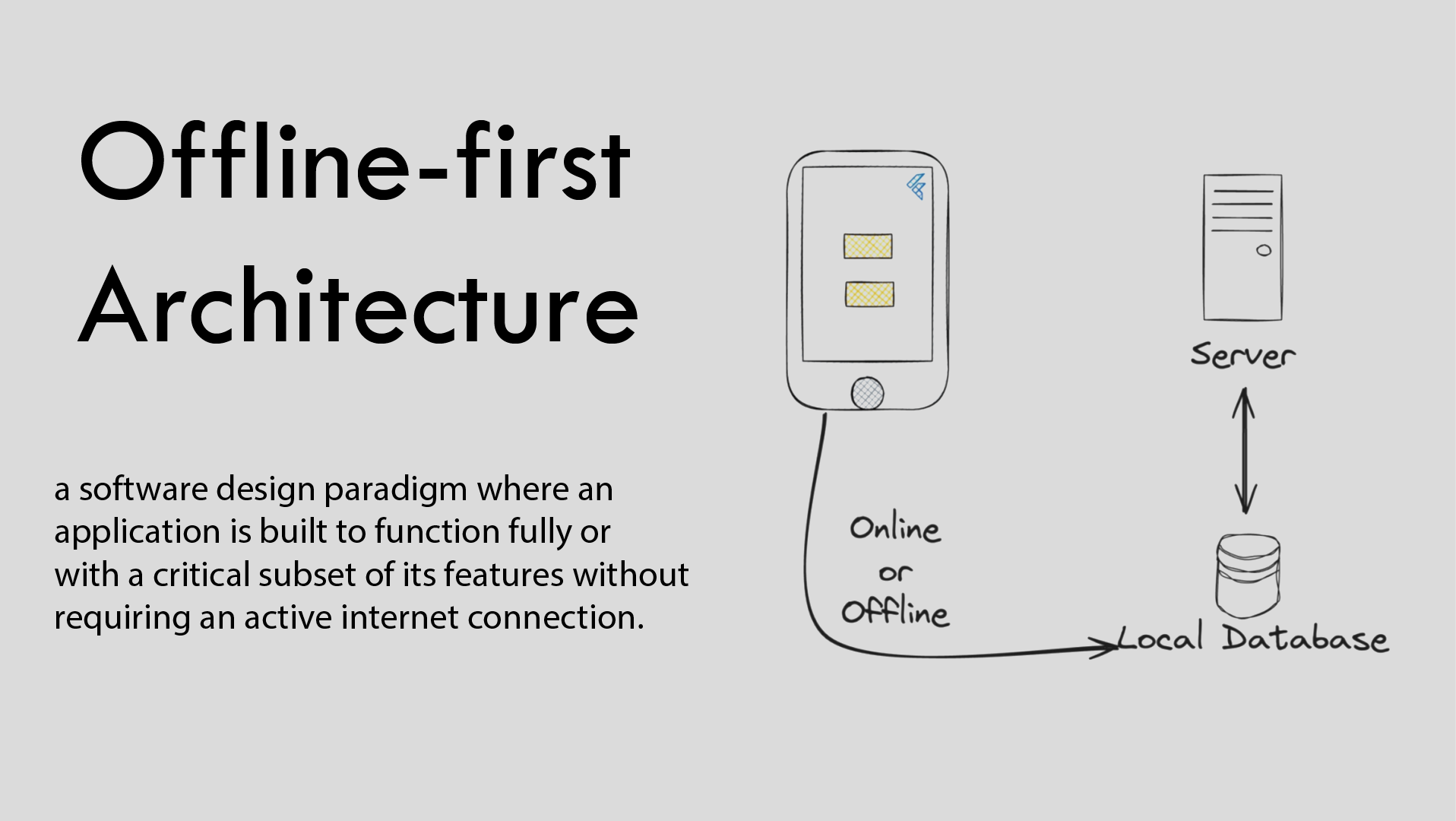
TL;DR: Most web apps are built with the assumption that connectivity is a given. In Pakistan — and in a lot of the world — it isn’t. Offline-first is not a feature. It’s a design decision you make at the architecture level, before you write a single route or component. Here’s how I think about it, and why it matters more than most developers admit.
The Internet Goes Down. Your Work Shouldn’t.
I’ve spent five years working in IT infrastructure, keeping systems operational. System management, data processing — these aren’t optional services you can pause when the ISP has a bad day. Operators need to keep working. Data needs to keep flowing. And it does, because the people who built these internal systems understood one thing: the network is not a foundation. It’s a convenience.
That lesson followed me into my own development work.
When I built Aafiyat — a patient management system for private clinics — I didn’t design around the internet. I designed around a doctor sitting across from a patient, on a Tuesday afternoon in Lahore, when load-shedding has knocked out the router and there are eight more patients in the waiting room. The software has to work. Full stop.
That’s offline-first thinking.
It’s Not “Offline Mode.” That’s a Different Thing.
There’s a distinction worth making here, because the two get confused constantly.
“Offline mode” is a fallback. It’s what happens when your app notices the connection is gone and gracefully degrades — maybe it shows cached data, maybe it locks certain features, maybe it just shows a banner that says “You’re offline.” It’s reactive. The connection is still the default assumption baked into the system.
Offline-first is a different starting point entirely. The local data store is the source of truth. The app reads from it, writes to it, and runs completely against it — with or without a network. Sync to the cloud happens in the background, when connectivity is available, as a secondary process. Not the other way around.
The architecture difference is significant. In an online-first app, you call the API and render what comes back. In an offline-first app, you write to local storage first, render from local storage immediately, and sync to the server as a background task your user may never even notice happening.
Where Local Storage Becomes Load-Bearing
In an Electron app like Aafiyat, SQLite is the local database. It sits on the user’s machine. Every patient record, every consultation note, every billing entry — written locally first.
Here’s the pattern I use for every write operation. Every entity in Aafiyat — patients, appointments, consultations, prescriptions, invoices — goes through this one class:
server/repositories/baseRepository.js — every create() in the app:
async create(data, options = {}) {
  const { v4: uuidv4 } = await import("uuid");
  const db = await this.getDb();
  const id = uuidv4();

  const columns = Object.keys(data);
  const values = Object.values(data);
  const placeholders = values.map(() => "?").join(", ");

  // 1. Write to the LOCAL SQLite database on disk. First. Always.
  //    There is no network call anywhere in this path.
  db.run(
    `INSERT INTO ${this.tableName} (id, ${columns.join(", ")}) VALUES (?, ${placeholders})`,
    [id, ...values]
  );

  // 2. Announce the change. The sync listener below picks it up
  //    and enqueues it into the sync_queue table.
  hooks.emit("entity:afterCreate", {
    entityType: this.entityType,
    entityId: id,
    data: { id, ...data },
    userId: options.userId || null,
  });

  return this.findById(id); // 3. Respond to the user immediately
}
That hook emission isn’t decorative. A listener turns it into a queued sync job:
server/listeners/syncListener.js — the enqueue half of the pattern:
hooks.on("entity:afterCreate", ({ entityType, entityId, data }) => {
  if (SKIP_ENTITIES.includes(entityType)) return; // never sync the queue itself
  _db.run(
    `INSERT INTO sync_queue
       (id, entity_type, entity_id, action, data, device_id, status)
     VALUES (?, ?, ?, ?, ?, ?, 'pending')`,
    [crypto.randomUUID(), entityType, entityId, "CREATE", JSON.stringify(data), _deviceId]
  );
});
The key thing to notice in that snippet: there’s no network call in the critical path of saving a record. The save completes. The UI confirms. The sync is queued. If the internet comes back in ten minutes or ten hours, the data gets pushed to Supabase then. The user doesn’t wait. The user doesn’t lose work.
The Sync Layer Is Where It Gets Honest
Sync is the hard part. Anyone who tells you otherwise hasn’t shipped a real offline-first product.
The questions you have to answer before you write the sync logic:
- What happens when the same record is edited locally and on the server before sync runs?
- What’s your conflict resolution strategy — last-write-wins, server-wins, or manual merge?
- How do you handle records that were deleted locally while the device was offline?
- What does the user see if sync fails silently?
For Aafiyat and Nankana Home Care, I use the same queue-based approach, tuned to each platform. Aafiyat keeps a sync_queue table inside its SQLite file — each row stamped pending, with a retry_count for the items that fail. The Nankana Home Care PWA (MediAssist Pro) keeps the same queue as an array in IndexedDB, each item stamped with a timestamp the moment it’s saved. When connectivity returns, the queued records are pushed, and anything that still fails stays in the queue to be retried.
Here’s the sync worker from the PWA — the actual queue processor that runs the moment the device reports online:
js/offline.js — MediAssist Pro (Nankana Home Care PWA):
// Saved offline: stamped and persisted to IndexedDB, not memory
async function addToOfflineQueue(item) {
  const q = await getOfflineQueue();
  q.push({ ...item, _queuedAt: new Date().toISOString() });
  await IDB.set("ma_offline_queue", q);
}

// The queue processor — runs when the device comes back online
async function syncOfflineQueue() {
  if (!navigator.onLine) return;
  const q = await getOfflineQueue();
  if (!q.length) return;

  let synced = 0;
  const failed = [];

  for (const item of q) {
    try {
      const { _queuedAt, ...clean } = item;

      // Patients staged from an accepted booking get activated on sync
      if (clean.pt?._pendingActivate) {
        clean.pt.is_active = true;
        delete clean.pt._pendingActivate;
      }

      // Upsert patient; insert visit — ignore the duplicate-key error on retries
      await SB.from("patients")
        .upsert({ ...clean.pt, user_id: window._uid }, { onConflict: "id" });
      const { error: visitErr } = await SB.from("visits")
        .insert({ ...clean.v, user_id: window._uid });
      if (visitErr && visitErr.code !== "23505") throw visitErr;

      synced++;
    } catch (err) {
      failed.push(item); // stays queued, retried next time
    }
  }

  await IDB.set("ma_offline_queue", failed); // only the failures remain queued
}

window.addEventListener("online", () => {
  updateOfflineBanner();
  syncOfflineQueue();
  refreshAllData();
});
Conflict resolution is the part you can’t fake. In Aafiyat, when a record exists both locally and in the cloud and they diverge, I resolve as last-write-wins on the timestamp — and not silently: the most recent updated_at wins, which is a deliberate trade-off that fits clinical workflows, where the local user is almost always the one making the latest change.
This isn’t glamorous code. There’s no clever abstraction. It’s just a reliable loop that does its job quietly, and that’s exactly the point.
How You Know Your System Needs This
Not every project warrants this architecture. A marketing landing page doesn’t need an offline-first data layer. A simple booking form probably doesn’t either.
But consider your users’ actual environment, not the environment you’re assuming when you develop in a city with fibre broadband.
A clinic in a small town. A pharmacy that stocks medicines between load-shedding windows. A field worker logging inspections from a site with one bar of signal. A POS terminal in a market where the router drops twice a day. These are real deployment environments, and they don’t care about your API response times.
If the answer to any of these is yes — my users will be in environments where connectivity is unreliable — then offline-first stops being a nice-to-have and becomes a basic requirement of a system that actually respects its users.
What This Costs You (Honestly)
More upfront complexity. You’re managing two data layers instead of one. You need to think about sync, conflict resolution, and local storage limits from day one. The initial architecture takes longer to design.
What it buys you: software that works when everything else breaks. That’s a trade-off I’ve made on every project I care about, and I’ve never once regretted it.
Further Reading
- You Don’t Own That Software. You’re Renting It. — why ownership, not connectivity, is the real reason to build this way
- Why I Build Offline-First — the three rules I follow, in short form
- Why I Build Software That Works When the World Doesn’t — where this obsession came from
On That Note — I Have Something to Say About Subscriptions
Offline-first is only half the argument. The other half is who pays for it, and how.
I’ve written about the same problem from the money side: why I don’t believe in monthly subscription pricing for the kind of clients and systems I build, and why the one-time payment model — done right — is better for both sides.
- Part 1: You Don’t Own That Software. You’re Renting It.
- Part 2: One-Time Payment vs. Monthly Subscription
If you’ve ever had a client complain that “the system stopped working” because they forgot to renew a subscription, you’ll want to read Part 1.
Have a System That Needs to Work Offline?
If you’re running a clinic, a pharmacy, a field-service operation, or any kind of local business with unreliable internet — and your current software isn’t handling that gracefully — I’d like to hear about it.
I’m not going to pitch you a template. I’ll ask questions about your actual workflow, your actual users, and your actual infrastructure, and then tell you honestly what makes sense.
Start that conversation at abdullahtayyab.dev — or check what I’m currently working on at abdullahtayyab.dev/now.
Abdullah Tayyab — Full-Stack Developer, Punjab, Pakistan.
Enjoyed this? Say hello →
Comments
Loading comments…
Comments are reviewed before they appear. No account needed.